for every "I already studied" you've heard

You'll know whether they actually studied.

Inkly turns the notes your child wrote in class into quizzes that make them practise remembering — and shows you a weekly report of what they actually did. Less than one hour of tutoring a month.

Free to start: 10 pages and 3 quiz sets a month. No card, nothing to install, works in any browser.

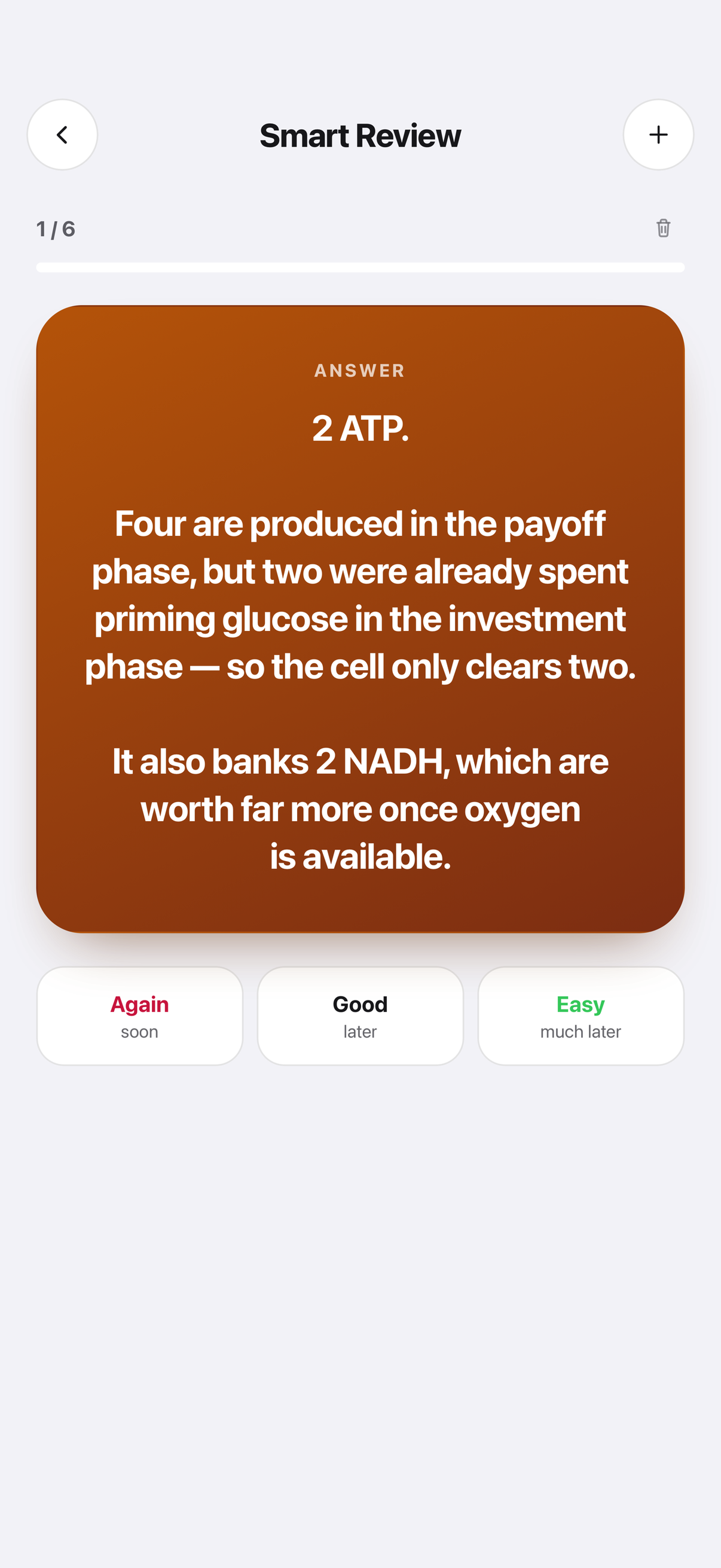
An Inkly flashcard made from a scanned Biology page, showing the answer 2 ATP with an explanation, and Again, Good and Easy buttons to rate how well the student knew it.

Your child Gets a study habit, not another app to ignore

They photograph tonight's page. Inkly reads the handwriting, files it under the right subject, and turns it into flashcards and a quiz. A homework list and a daily streak bring them back tomorrow.

You Get a report, without reading over their shoulder

A Sunday email and a dashboard: which days they studied, their streak, quiz scores by subject and what's due or already overdue. Progress only — never their notes, never their questions to the AI.

Why "I studied" so often isn't true

Most students study by rereading. It feels like learning, because the page starts to look familiar — and familiar feels like knowing. A test doesn't ask them to recognise the page. It asks them to remember it with the page shut. Inkly closes the page.

1

They photograph the page they already wrote

Their own notebook, a whiteboard, a worksheet. No importing, no folder system to invent, no typing it up again. About a minute, on the phone already in their hand.

Free · 10 pages a month
2

Their messy notes become quizzes that actually test them

Flashcards and questions built from what they wrote — not a generic question bank. They find out tonight which bits they'd have blanked on, while there's still time to fix it.

Free · 3 sets a month
3

You get the Sunday email

Days studied, streak, scores by subject, homework due and overdue — for each child. The first one tells you more than a term's worth of "how was school?" at the dinner table.

Parent plan
what you see as a parent

A week on one screen, every Sunday.

You don't have to ask, chase, or check their phone. It arrives by email and it's there in the dashboard whenever you want it — on your phone, no app to install.

Sofía
This week in Inkly · Sunday
This week
4/7days studied
12day streak
31cards & quizzes
Quiz scores
Biology↑ 86%
History↓ 58%
Homework
History essay draft Overdue
Biology test — chapters 4–5 Tue 3
You see progress, not notes or AI chats — and your child can see exactly what you see.

So you can tell, in about ten seconds:

  • Whether they sat down at allFour days out of seven, and which four. Not a promise — the days they actually opened their notes and answered questions.
  • Which subject is quietly slippingScores by subject, with an arrow for the direction they're moving. History at 58% and falling is the conversation to have this week, not the one to discover on a report card.
  • What's already lateHomework and tests from their own list, with overdue in red. The thing they forgot to mention.
  • Not what they wroteYou never see the contents of their notes, and you never see what they asked the AI. A teenager who knows you're reading their notes stops writing them down.
Set it up for your child

An example week. Real reports use your child's own subjects, scores and homework.

What it changes, in plain terms

Tagged honestly, so you know what the free account does before you decide anything.

They practise remembering, not rereading

Free · 3 sets a month

Every page becomes cards and questions they have to answer with the notebook shut. This is the single change that moves a grade, and it's the one students skip because it's uncomfortable.

The phone becomes the thing doing the studying

Free

No laptop, no printing, nothing to install. They photograph the page and drill the cards on the bus. The device you keep arguing about is, for twenty minutes, the one doing the work.

Nothing gets remembered at 11pm the night before

Free

Assignments and tests live in one list, with what's due next on the home screen — and on your weekly report. Snapping a worksheet or saying it out loud to add it is a paid feature.

A reason to come back tomorrow

Free

A visible streak of the days they showed up, with two rest days built in so one busy week doesn't wipe it out and take their motivation with it.

Explanations pitched at their year, from their own notes

Pro

When they get something wrong, it explains it from their page and shows which note it used — at the grade level they set, not a textbook's. A patient second explanation, at 10pm, when you've run out of ways to say it.

It won't do the work for them

Free

It asks the questions; they give the answers. It won't write an essay or hand over homework answers. If that's what they're after, this is the wrong app — deliberately.

The app they'll actually open

Real screens. Before the first scan Inkly asks five questions, so it starts from your child's year and subjects instead of a generic setup. Under a minute.

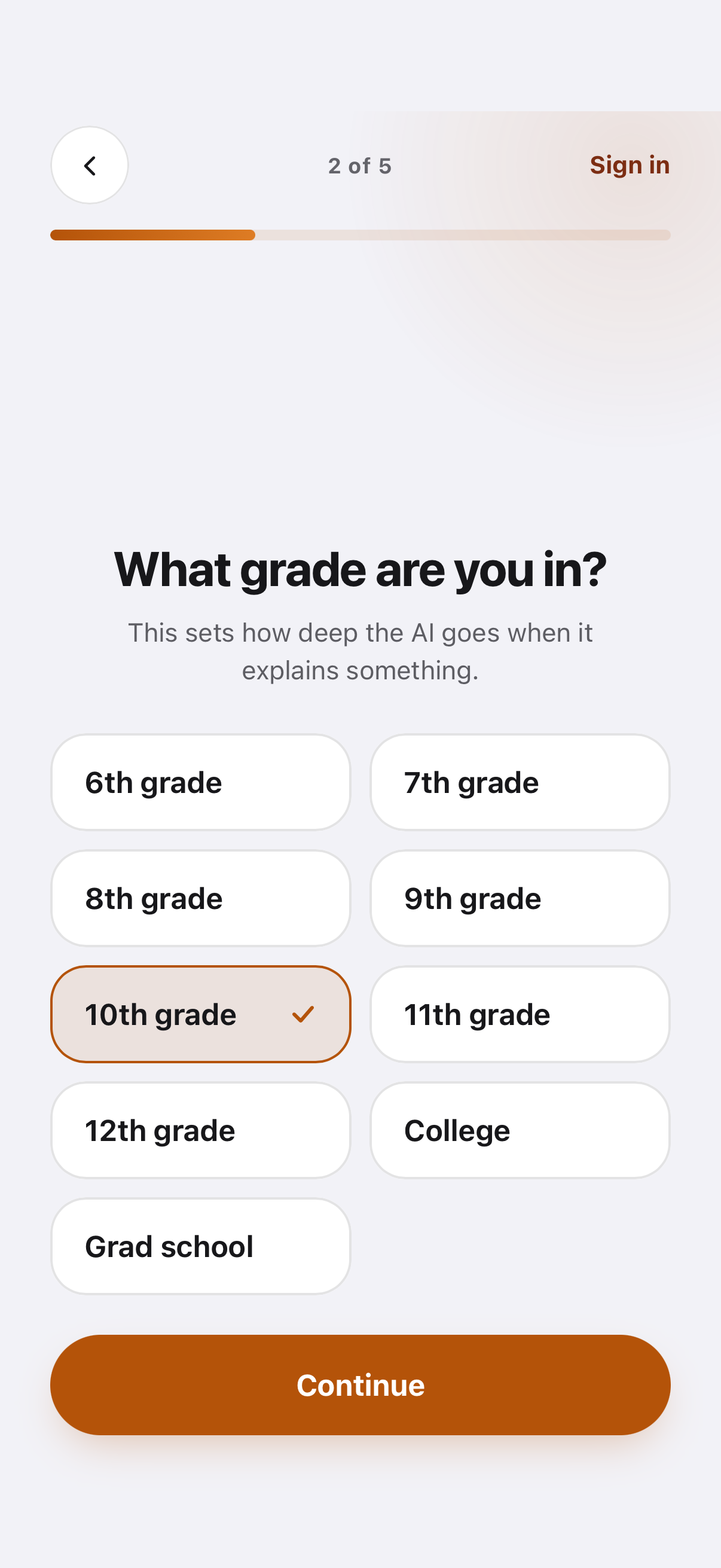
Inkly asking which grade you are in, with options from 6th grade to grad school.
Their year sets how deep explanations go — 8th grade and first-year university get different answers.
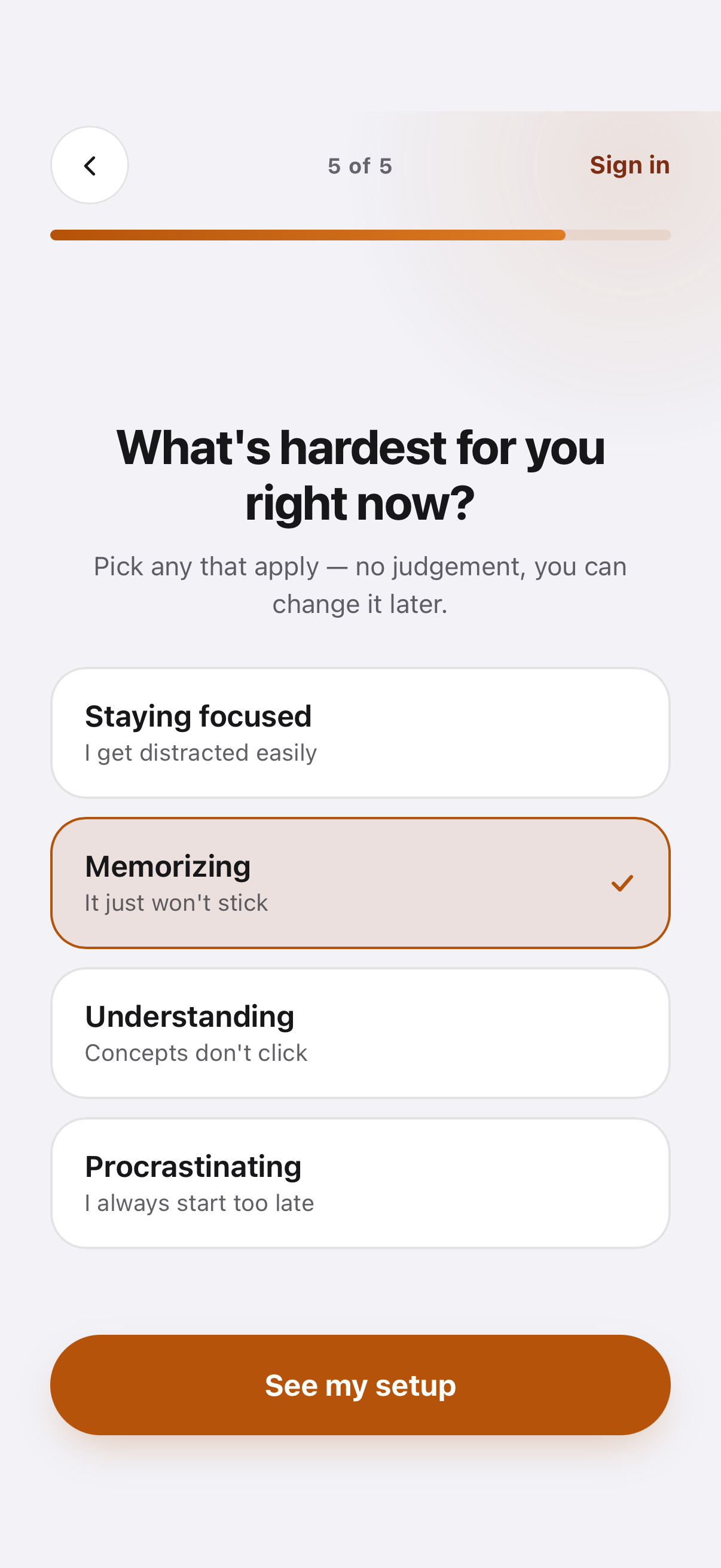
Inkly asking what is hardest right now, with options including staying focused, memorizing, understanding and procrastinating.
They say what's hardest — focus, memorising, procrastinating — and it shapes what Inkly puts in front of them.
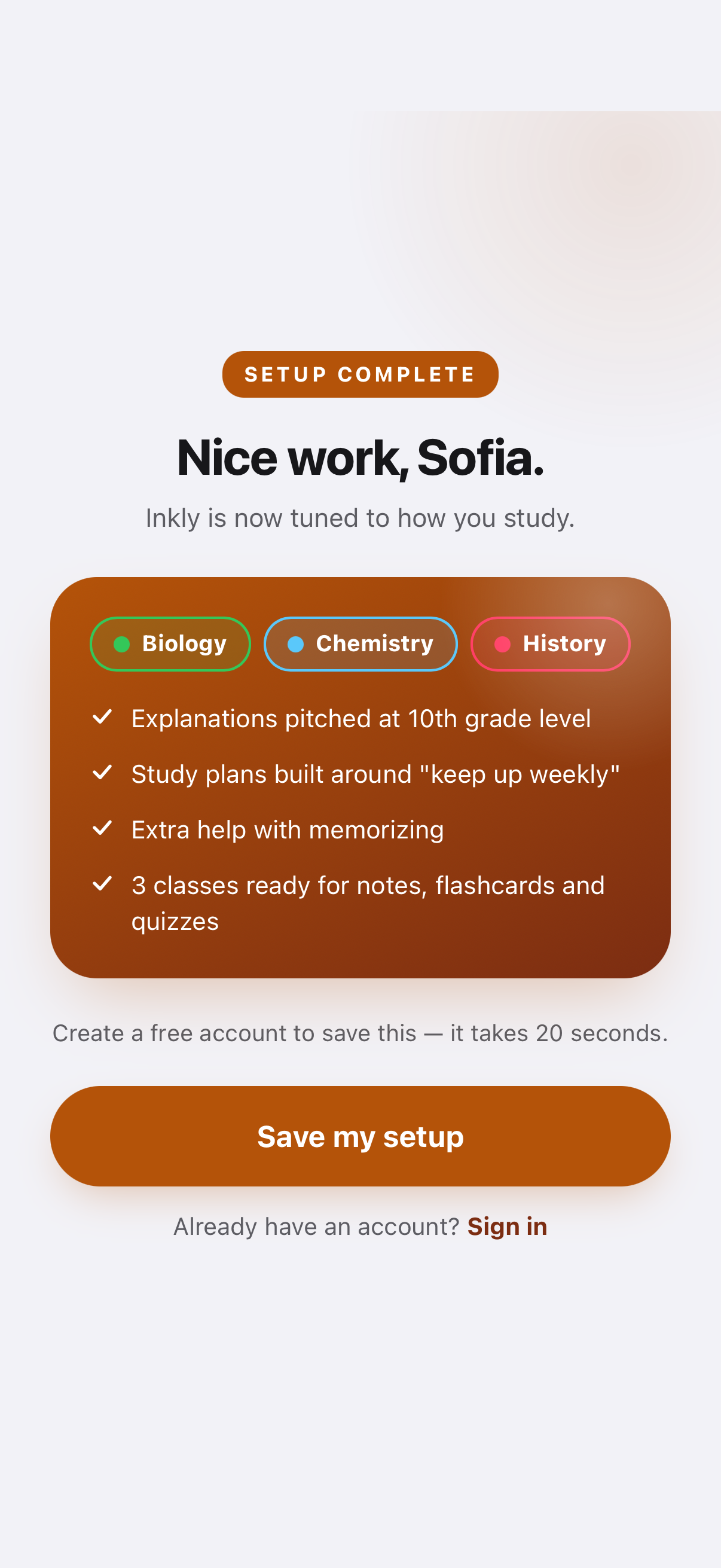
Inkly setup complete screen listing the chosen classes and study preferences.
Their classes become the subjects their notes file into. One screen, and it's set up.
the questions parents actually ask

Private, ad-free, and no strangers.

Straight answers, before you sign up rather than after.

"Are their notes used to train AI?"

No. Never — not their notes, not their photos.

Their pages and the photos of them stay theirs, are not used to train any AI model, and are not sold or shared. We'd rather charge you a fair price than make their schoolwork the product.

"Can anyone message my child?"

There is nobody else in the app.

No ads, ever. No feed to scroll, no public profiles, no messaging, no comments, no leaderboard against other kids. It's their notes and their questions. Inkly is for ages 13 and up.

"Will I be reading their notes?"

No — you see the progress, not the content.

Days studied, scores, homework. Never note contents, never their AI conversations. Your child can open the same screen and see exactly what you see, so nothing about it is hidden from them.

"What if they don't stick with it?"

Seven days free, then cancel in two taps.

Try a paid plan free for 7 days before anything is charged. Cancel any time from Settings → Plan; you keep it until the period you've paid for ends, then drop to the free plan. Their notes stay put either way.

And where it falls short

for students

Student? The short version.

Photograph tonight's page. Inkly makes flashcards and a quiz out of what you wrote, so you find out what you'd blank on before the test does — instead of rereading the page four times and hoping. Free for 10 pages and 3 sets a month, no card, works on your phone's browser.

Need a parent to pay? Send them this page. The section above answers what they'll ask before they ask it — including the private-notes and no-ads part.

Send to a parent

Cheaper per month than one hour of tutoring.

Parent and Family are the plans that add your dashboard and the weekly email. Study is the cheap one, for a student who just wants to scan and revise. No school licence, no setup call, cancel any time.

Parent Most parents pick this

$119.99 /year

1 parent + 1 child. Or $12.99 monthly. In Mexico: MX$2,199 a year or MX$239 a month.

  • Everything in Inkly Pro, with more room: 300 pages and 120 decks or quizzes a month
  • Progress dashboard for you
  • Sunday email: days studied, scores, homework
  • Never their notes or AI chats
  • You pay with your card; they just log in
Get the Parent plan

Free for 7 days first. Cancel any time.

Family

$22.99 /month

Up to 2 parents + 3 kids. Monthly only — a family buys on a school term, not a calendar year. In Mexico: MX$399 a month.

  • Inkly Pro for every child
  • No monthly limit on scans, decks or quizzes
  • A dashboard for each child
  • Weekly email to both parents
  • Under $8.35 a month per child
Get the Family plan

Basic

Free · forever
  • 10 scanned pages a month
  • 3 flashcard or quiz sets a month
  • Unlimited typed notes
  • Homework list and streaks
  • 5 AI questions a month
  • No parent dashboard or weekly email
Create free account

No card. Good enough to find out whether they'll use it.

Study

$49.99 /year

Works out at $4.17 a month. Or pay $4.99 monthly and cancel whenever. In Mexico: MX$889 a year or MX$89 a month.

  • 75 scanned pages a month
  • 10 flashcard decks or quizzes a month
  • Unlimited typed notes
  • Homework list, streaks and spaced review
  • No AI chat, summaries or voice
  • No parent dashboard or weekly email
Get Inkly Study

For a student who wants to scan and revise, and does not need the AI.

Student

$89.99 /year

Works out at $7.50 a month — a 25% saving. Or pay $9.99 monthly and cancel whenever. In Mexico: MX$1,599 a year or MX$179 a month.

  • 150 scanned pages a month
  • 60 flashcard decks or quizzes a month
  • 150 AI questions and summaries a month
  • Study plans built around their goals
  • Snap or say homework into the list
  • Chat that answers from their own notes
  • No parent dashboard or weekly email
Get Inkly Pro

Try it free for 7 days first. Under 18? A parent can pay at checkout with their card.

Questions parents ask

What exactly do I see — and what don't I?

You see: which days of the last seven they studied, their current streak, how many cards and quizzes they practised, their quiz scores by subject with the direction they're moving, and their homework and tests with anything overdue flagged. You don't see: the contents of their notes, or anything they asked the AI. Your child can open the same screen and see exactly what you see — we show them, rather than hiding it from them. It arrives as an email once a week and lives in the dashboard the rest of the time.

Will they actually use it?

It starts from the notebook they already carry and the phone already in their hand: one photo, about a minute, nothing to type up. Their homework list and a daily streak are what bring them back. That said — you'll know. The free plan costs nothing, and the weekly report shows you four grey days just as plainly as four green ones. Start on the free plan, or take the 7-day trial, and look at the first report before you decide.

Isn't this just AI doing their homework?

No, and it's built not to be. Inkly asks the questions and your child answers them. When they get something wrong it explains it from their own notes and points at the note it used, then asks again. It will not write an essay or hand over homework answers. It's closer to a patient teacher who has read their notebook than to an answer machine.

Are their notes private? Do you train AI on them?

Their notes and page photos are private to their account, are never used to train any AI model, and are not sold or shared. There are no ads, no public profiles, no messaging and no feed, so there's nobody for a stranger to be. Inkly is for students 13 and up.

Is the free plan actually free?

Yes. 10 scanned pages a month, 3 flashcard or quiz sets a month, 5 AI questions a month, a homework list and unlimited typed notes — no card, no trial clock, doesn't expire. A paid plan raises those monthly numbers rather than removing them: Study goes to 75 pages and 10 sets, Pro to 150 pages, 60 sets and 150 AI questions, and Family stops counting altogether. AI chat, study plans and voice start at Inkly Pro; the parent dashboard and the weekly email come with the Parent or Family plan.

How good is it at reading handwriting?

Good on ordinary school handwriting, including messy notes and diagrams with labels. It struggles with heavy cursive and very faint pencil. Inkly keeps the original photo alongside the typed text, so a word can be checked against what they actually wrote and corrected — a misread word costs a few seconds rather than the page.

Do they need a new device, or an app?

No. Inkly runs in any browser, on a phone or a laptop, and the account syncs between them. On a phone it can be added to the home screen and opens fullscreen like an app. There is no Android app, and it isn't on the App Store yet. Your dashboard works the same way — open it in your own browser, nothing to install.

How much is it, exactly?

Inkly Pro is $9.99 a month, or $89.99 for a year — which works out at $7.50 a month. Twelve monthly payments come to $119.88, so a year up front saves 25%. In Mexico it is MX$179 a month or MX$1,599 a year, charged in pesos. There is also Inkly Study at $4.99 a month (MX$89) for a student who wants the scanning and the flashcards without the AI. You can try Pro free for 7 days first. The Parent and Family plans — the ones that include your dashboard and weekly email — are listed in Pricing above.

My child is under 18 — can they have an account?

Yes, from age 13. The free plan needs no card at all, so they can start tonight without you. For a paid plan you pay at checkout with your card, and on the Parent or Family plan the subscription sits with you — your child just logs in. It can be cancelled any time from the app.

How do I cancel?

Any time, from Settings → Plan. You keep the plan until the end of the period you've already paid for, then it drops to the free plan. Their notes stay put either way, and nothing is deleted.
The next test is already on the calendar.

Set it up tonight. One photo of today's page, and by Sunday you'll have the first report — or the first honest answer about whether they'll use it. Free to start, no card.

No card to start. 10 free pages and 3 quiz sets a month, forever.